
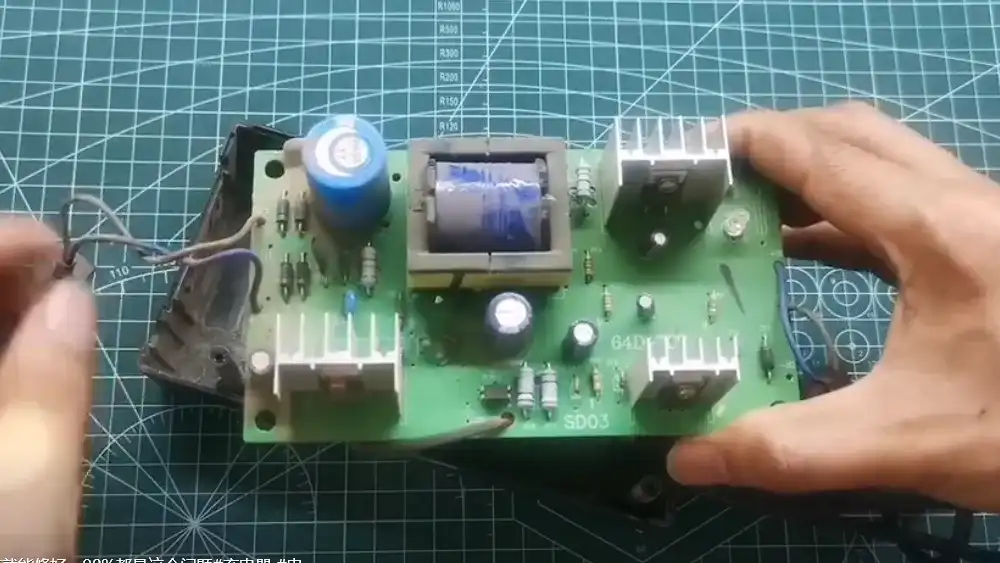
Electric Bicycle Charger Fault Repair Experience: Testing, Diagnosis, and Repair Case Analysis
Charger faults are common on electric bicycles, but most can be traced to a few areas: the AC input and rectifier circuit, the switching power supply, the voltage regulation and charging control circuit, or the output and protection circuit. This guide covers charger testing, fault diagnosis, repair steps, circuit-level analysis, and 36 real repair cases. It begins with general test items and testing principles, then explains how to diagnose high-voltage, low-voltage, and mixed faults. Later sections provide step-by-step repair methods for dual-ended and single-ended chargers, followed by detailed case studies. Because charger repair involves high voltage and live circuits, always discharge filter capacitors and follow the safety precautions before probing or replacing components.
Electric Bicycle Charger Testing and Troubleshooting
1. Charger Testing
1.1 General Charger Testing
1.1.1 Test Items: Charger test items include overall functional testing, sub-unit testing, component testing, and circuit testing.
a. Overall Test Items. These include output voltage, current, waveform, positive and negative pulse amplitudes and intervals, overall efficiency, and various control and protection functions.
b. Sub-unit Testing. These include unit input and output circuits, as well as their voltage and current levels, and the effectiveness of sampling, adjustment, or control functions.
c. Component Testing. This primarily involves verifying whether the characteristics of integrated circuits, various modules, diodes, transistors, resistors, capacitors, and other components meet the standards specified for each grade in the manual.
d. Circuit Testing. This primarily involves verifying whether the circuit is operating normally, assessing the stability of voltage and current under load conditions, confirming that the duty cycle of pulse-width modulation (PWM) can be adjusted smoothly and continuously from 0% to 100%, and ensuring that the circuit’s efficiency and all functions meet the specified performance metrics.
1.1.2 Analyzing Circuit Diagrams One should analyze the components of the circuit, the function of each part, and the role of components within each section. Understand the functions of each pin on devices such as the main chip, operational amplifiers, and integrated circuits used in the circuit; clarify the relationships between input, output, control, power supply, and ground terminals, as well as peripheral components and their respective pins. Only then can the different functions within the circuit be distinguished, and the flow of current and signals determined. Then, determine the cause of the fault and the faulty components based on the type of fault.
1.1.3 Testing Principles Generally, a circuit is read from left to right, with the left side representing the input (the starting point) and the right side representing the output (the ending point); the top is positive, and the bottom is negative. The center of the circuit diagram is divided into one or more functional units, such as detection, comprehensive comparison and calculation, adjustment, control commands, execution, and protection. Before testing a circuit, one must understand its structure, the boundaries of its functional units, and the relationships between them.
1.1.4 Testing Methods After analyzing the cause of the charger’s malfunction, first inspect potential fault points, such as abnormal colors or strange odors; gently wiggle components by hand to check for looseness; and examine the solder joints on the back of the circuit board. The specific testing methods are as follows:
a. Identify key test points and apply power step-by-step from back to front to measure voltage and current.
b. Check whether the voltage difference across the resistor meets the requirements.
c. The voltage across a capacitor is the circuit’s operating voltage. If no voltage is present, the capacitor has broken down and is short-circuited.
d. Check the voltages at each pin of the voltage regulator and the standalone operational amplifier. The output voltage of the voltage regulator is approximately equal to the input voltage plus the control voltage.
e. Test the integrated circuit. Use the voltage range of a multimeter to measure the voltages at each pin of the integrated circuit while it is active, and compare the results with those of a normal integrated circuit of the same model. Alternatively, use the multimeter’s resistance setting to measure the resistance between each pin of the integrated circuit and ground when the circuit is powered off. Compare these values with those of a normal integrated circuit of the same model; they should match the standard values. Otherwise, the integrated circuit is faulty. Integrated circuits can only be replaced; they cannot be repaired.
For example, when performing an in-circuit test on the TL494 pulse-width modulation (PWM) integrated circuit (see Figure 1 for pin configuration), it is crucial to remember the key points of the TL494 IC: Pin 12 is the positive power supply; Pin 7 is the negative power supply and also the common reference ground; Pin 15 is the inverting input of Op-Amp 2, and Pin 16 is the non-inverting input of Op-Amp 2; Pin 1 is the non-inverting input of Op-Amp 1, and Pin 2 is the inverting input of Op-Amp 1; the outputs of these two amplifiers are connected via diodes in an “OR” configuration to Pin 3; as long as Pin 3 is at a high level, the IC stops outputting a signal; Pin 14 is +5V; if this voltage is absent, the IC is likely damaged, but the presence of +5V does not necessarily mean the TL494 is functioning properly.
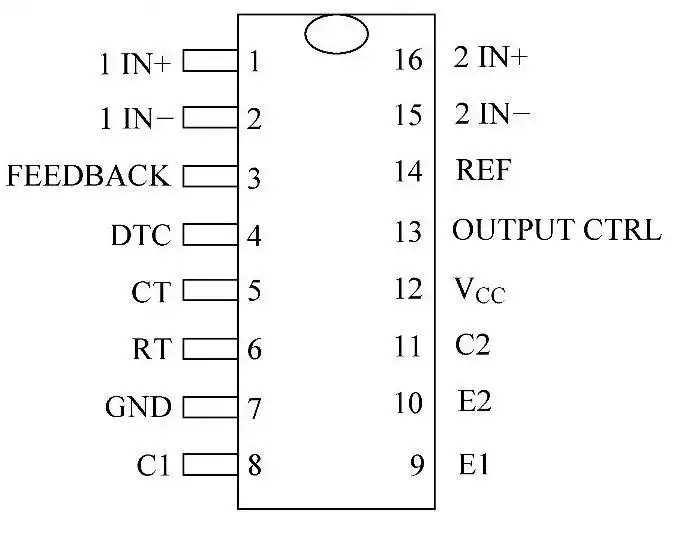
Figure 1: TL494 Pinout
You can further utilize the 1.5V voltage provided by the R×1 resistance range of an analog multimeter as the trigger voltage to flip the voltage comparator, allowing for a rough on-site assessment of the TL494’s condition. The specific procedure is as follows:
Connect a digital voltmeter between Pin 3 and ground, and observe any voltage changes; connect the positive terminal of a 16V DC power supply to Pin 12, and the negative terminal to ground; after verifying the connections are correct, turn on the 16V DC power supply; then set the analog multimeter to the R×1 resistance range, connect the black probe to Pin 16, and the red probe to Pin 15. At this point, the output of Op-Amp 2 should be at a high level, resulting in 5V at pin 3. Similarly, connect the black probe of the analog multimeter to pin 1 and the red probe to pin 2; at this point, the output of Op-Amp 1 should be at a high level, and pin 3 should also read +5V. If the results match the above conditions, you can be reasonably certain that the TL494 is functional; otherwise, the integrated circuit is faulty.
1.2 Quick Test to Determine Charger Functionality
The quick test method to determine charger functionality is as follows:
a. Check whether the charger’s indicator light is functioning normally.
b. Check the charger for any unusual odors or signs of burning.
c. Use a multimeter to check whether the charger’s power cord is shorted.
d. Use a multimeter to check whether the charger’s voltage is normal.
2. Diagnosis and Troubleshooting of Charger Faults
2.1 Classification of Faults
The main types of charger faults include: ① high-voltage faults; ② low-voltage faults; ③ mixed high-voltage and low-voltage faults. We will now use a single-transistor switching power supply charger that employs the TL3842 to drive a field-effect transistor as an example to illustrate the troubleshooting methods. The key pins of the TL3842 (UC3842) integrated circuit are pins 5, 7, and 6 (pins 5 and 7 are power supply pins, and pin 6 is the pulse signal output pin). When troubleshooting charger faults, these three pins should be the primary focus of inspection.
2.1.1 High-voltage faults are primarily characterized by the indicator light not illuminating. Causes include a blown fuse, a shorted rectifier diode, a bulging or burst filter capacitor, a shorted switching transistor, an open-circuit start resistor, a short circuit on pin 7 of the TL3842, among others. Generally, when there is a leakage or short circuit in the low-voltage circuit, or when the pulse waveform output from pin 6 of the TL3842 is abnormal, the switching transistor will burn out.
2.1.2 Low-voltage faults are primarily characterized by the red light remaining on continuously while the green light stays off; the output voltage is low, approaching 0 V, resulting in insufficient battery charging. The primary cause of this fault is reverse polarity connection between the charger and the battery’s positive and negative terminals, leading to breakdown of the dual operational amplifier (most commonly the LM358).
2.1.3 For faults involving both high- and low-voltage circuits, visually inspect for obvious damage, such as broken circuit board traces (caused by carrying the unit in the vehicle or physical impact), blown fuses, signs of burned-out resistors, or burst capacitors. Use the (appropriate) resistance setting on an analog multimeter to thoroughly test all diodes, transistors, optocouplers (such as the 4N35), field-effect transistors, electrolytic capacitors, and integrated circuits on the circuit board, paying particular attention to the low-voltage main rectifier (e.g., 16A/60V fast-recovery diodes), mains rectification capacitors, and low-voltage main filtering capacitors.
In general, this is caused by a short circuit in the low-voltage circuit, resulting in widespread burnout of power components. Some chargers feature special protection functions at the output, such as reverse-polarity protection and short-circuit protection, which involve adding a relay to the output. In the event of reverse polarity or a short circuit, the relay will not operate, and the charger will not output any voltage.
2.2 Troubleshooting and Repair
Common faults in three-stage switching-mode chargers include: ① The indicator light does not illuminate. The primary symptom is that the indicator light remains off. If the fuse has not blown, the issue is typically an open circuit or a cold solder joint in the high-voltage circuit. Locate the open circuit by visual inspection and testing with a multimeter set to the resistance range, then resolder the connection; if the fuse has blown, it indicates component failure, such as a short circuit in the AC bridge rectifier diodes, a short in the rectifier/filter capacitor, or a breakdown in the power switch transistor. Replacing the damaged components will resolve the issue. ② Reversed polarity connection between the charger and the battery’s positive and negative terminals typically causes low-voltage circuit failures. Most often, this results in a burned-out charging current sampling resistor or a breakdown of the LM358 (or LM324). Symptoms include the red light remaining on continuously, the green light not illuminating, low output voltage, or an output voltage approaching 0 V; replacing these components will resolve the issue; if the indicator lights do not illuminate, the scope of damage is likely more extensive. ③ If the charging status indicator behaves abnormally (failing to switch properly), the charger emits unusual noises, or the battery fails to charge, you should first determine whether the problem lies with the battery or the charger. Use a charger tester to inspect the charger separately; if the issue is with the charger, it should be repaired.
Charger malfunctions are rare and mostly occur in older units that have been in use for many years; however, extra caution should be exercised during use to prevent and troubleshoot issues promptly, thereby avoiding damage to both the charger and the battery.
Charger Troubleshooting Methods
a. During charging, the power indicator light is on and the charging indicator light is orange. First, check whether the charger’s output plug and the battery box’s charging plug are loose. If they are secure, check whether the fuse in the battery box is blown (typically 2A) or whether the fuse holder is loose. Use a multimeter set to the voltage range (200V) to verify that the no-load output voltage is within the range of 35–44V; if it does not meet this requirement, it indicates an open circuit in the charger’s output wire.
Turn on the charger, replace the output wire, and ensure the positive and negative terminals of the original unit are not reversed; this will resolve the issue.
b. Neither the power indicator light nor the charging indicator light is on. First, check the connection between the charger’s input power plug and the 220V mains power. If the connection is poor, open the charger’s casing and inspect the fuse; if the fuse is intact, check whether the power input wire is properly connected, whether there are cold solder joints on components near the high-voltage area of the circuit board, and whether the fuse holder has poor contact. Generally, pay special attention to checking for cold solder joints on vulnerable components such as the transformer and transistors.
Replace the damaged components listed above to resolve the issue.
Note: When the components listed above are damaged, one or two may fail simultaneously; in some cases, several may fail at once. During repair, check them one by one, and only apply power after replacing these components.
c. The charger overheats severely, and the casing may even burn or deform. This issue is primarily caused by loose components. Since charger circuit designs and the electrical components used vary, chargers operate under different conditions. Some charger casings become very hot, while others remain warm; new chargers may also emit a smell of insulating varnish and plastic additives. Focus your inspection on the large filter capacitors, power transistors, and rectifier diodes; if any are damaged, simply replace the faulty components.
d. The charger generates excessive heat and emits abnormal noises, while the power and charging indicator lights are dim and flickering. Severe overheating is most often caused by damage to the RC damping components in the output stage, or by an open circuit in the filter capacitor or a cold solder joint. As for the flickering lights, this is generally caused by a faulty power supply thick-film module.
Replace the damaged components listed above to resolve the issue.
e. The charger’s output voltage is too high (greater than 50V). This can be diagnosed by checking whether the sampling input voltage of the power supply thick-film module is normal. It is generally caused by a change in the value or failure of the sampling resistor; if the sampling resistor is faulty, simply replace the component. Note: After replacement, use a multimeter to recheck the charger’s output voltage. The normal range is 41–44 V. If there is a deviation, adjust the components to ensure the charger’s output voltage remains within the normal range.
f. A copper foil in the charger’s output section has burned through. This fault is generally caused by reverse connection of the battery’s positive and negative terminals. First, check the charger’s fuse. If the fuse is intact, inspect the power supply thick-film module and the protection circuit; reconnecting the broken copper foil will restore normal operation; if the fuse has blown, further testing is required to check the high-power circuit and protection circuit one by one. If any components are damaged, they should be replaced.
g. Abnormal charging indication. Once the battery is fully charged, the charger should display an indicator—typically, the light changes from red to green, or in some cases, from green to yellow, indicating that the battery is nearly fully charged. If the LED does not light up while the battery is charging, or if the color does not change after the battery is fully charged, this indicates a fault in the charging indicator and should be repaired. The LED not lighting up is mostly due to a problem with the LED itself or a wiring issue.
h. Incomplete charging. The main causes of incomplete charging are: the charger stops automatically after operating for a period of time, resulting in a loss of current and voltage. This is generally a circuit issue, most commonly caused by cold solder joints, poor contact, or component failure.
This fault may function normally at room temperature but becomes apparent as the temperature rises; it can occur gradually or suddenly.
i. Intermittent charging is the same fault as incomplete charging and is mostly caused by poor circuit contact.
Common troubleshooting methods for chargers are shown in Figure 2.
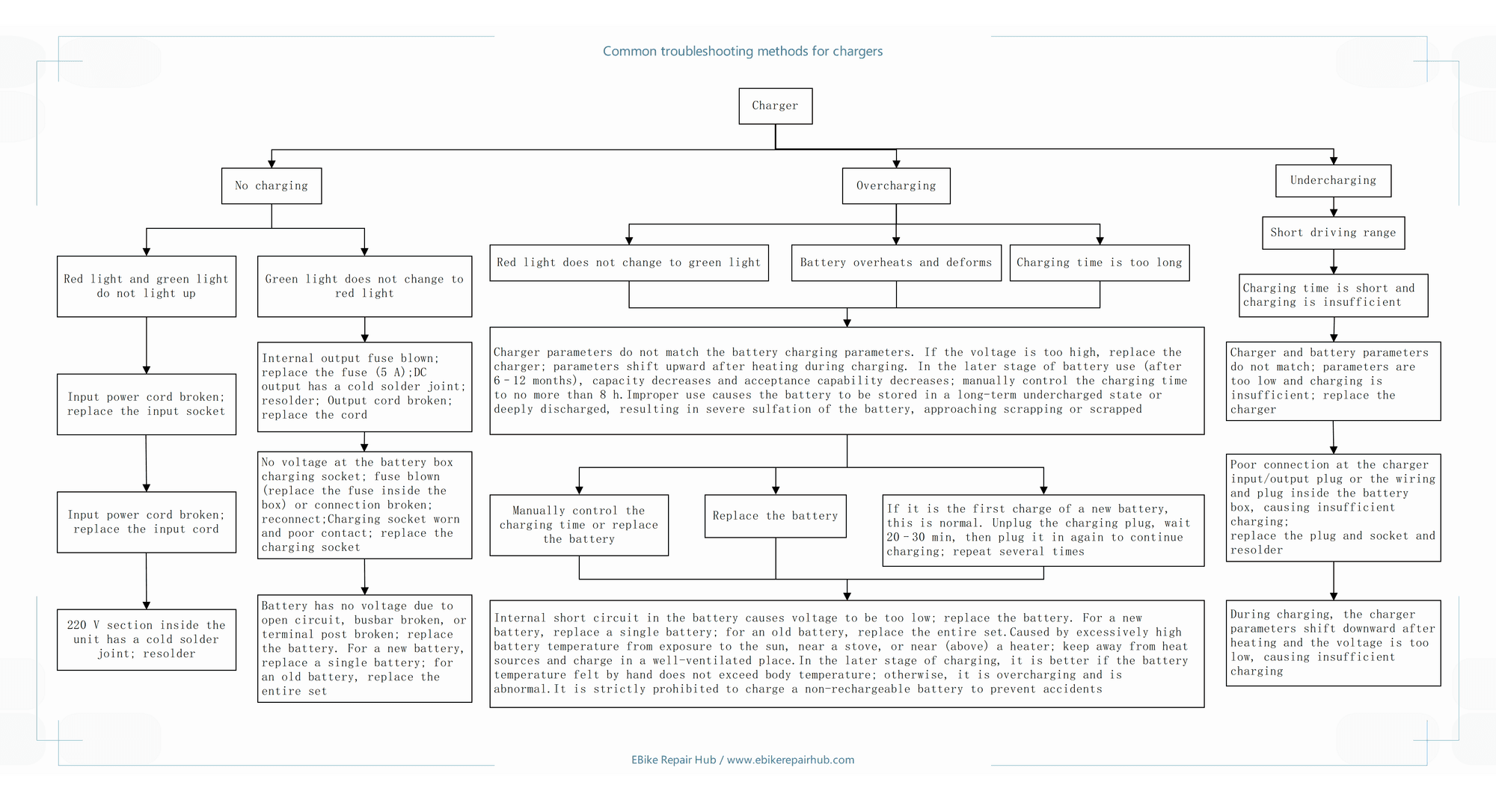
Figure 2: Common Troubleshooting Methods for Chargers
The flowchart above gives an overview of charger fault diagnosis. For the complete troubleshooting procedure, see:
E-Bike Charger Diagnosis: No Charging, Overcharging & Undercharging →
3. Repair Steps and Methods for Dual-Ended Chargers
Step 1: Visually inspect whether the fuse is blown, whether the switching transistors and resistors are discolored or cracked, whether the capacitors are bulging or leaking, and whether there are cold solder joints on the circuit board.
Step 2: Use the resistance measurement method to measure circuit resistance and component resistance, focusing on the power supply rectifier diodes VD1–VD4 and switching transistors VT1–VT2. Measure the resistance of the resistors and capacitors in the base circuits of VT1 and VT2, and the forward and reverse resistances of the diodes. Use the comparison method to verify whether the base circuit resistances of VT1 and VT2 are consistent, thereby identifying the faulty component.
Step 3: Connect a DC power supply of approximately +20 V across the power supply terminals of the PWM IC. Use the waveform method to measure the waveform at the output pins of the PWM IC (pins 8 and 10 of the TL494) to check for a 50 kHz square wave output. If no square wave is present, the TL494 is damaged; a square wave output indicates that the PWM IC is functioning normally. Next, measure the square wave waveform at the collector of the push-pull driver transistors (VT3, VT4).
If the waveforms are distorted or inconsistent, VT3 and VT4 are faulty. If the waveforms are square and consistent, the push-pull driver circuit is functioning normally. Finally, measure the base of VT1 and VT2; the waveform should be square. If it is abnormal, VD5 (VD8), R4 (R11), R6 (R8), and C9 (C10) may be damaged. Remove them and perform further measurements to identify the faulty components.
Step 4: Safe Repair Method for the Switching Conversion Circuit. Turn off the external power supply to the pulse-width modulation (PWM) circuit and connect a low-voltage power supply from the main power source. Typically, use a voltage regulator to output an AC voltage of approximately 40 V. After power-on, if the rectifier circuit outputs a DC voltage greater than 40 V, this indicates that the rectifier circuit is functioning normally and the switching transistors have no short-circuit faults; if there is no voltage or the voltage is low, this indicates that fuse FU1, rectifier diodes VD1–VD4 are faulty, and the filter capacitors C7 and C8, as well as the switching transistors VT1 and VT2, are shorted. These components can be removed and tested using the resistance method to identify the faulty ones.
Once the rectifier circuit’s output voltage is normal, connect the +20V DC power supply to the pulse-width modulation (PWM) circuit and the 40V AC low-voltage power supply to the main circuit. Measure the square-wave waveforms at the emitter and pins 7 and 8 of the switching transformer T3. At the same time, check whether VT1 and VT2 are getting hot. If the waveform is distorted and VT1 and VT2 are hot, then VT1, VT2, and VD15 are faulty. If the waveforms show no distortion and the switching transistors do not overheat, the next step is to measure the output voltage at the +40V terminal of the secondary-side rectifier output (across terminals C21). A voltage of 9V indicates that the entire circuit is essentially functioning normally. Disconnect the external power supply and plug in the mains power for testing.
The repair steps for the switching-mode charger described above are relatively complex but safe and reliable. Since AC-DC conversion-type chargers operate under high-voltage pulsed conditions, any latent faults remaining after repair could cause damage to VT1, VT2, and other components the moment the power is connected, potentially even exacerbating the problem.
This protective repair method is safe and reliable, allowing latent faults to be detected without damaging components. It is also suitable for repairing other inverter-type switching power supplies and related products.
4. Circuit Diagram for Repairing a Single-Ended Charger
Common faults in this type of charger include damage to the field-effect transistor VT1, damage to R2, R6, R4, R7, and R19, and bulging of C14 with peeling insulation.
a. Visually inspect the charger to check whether resistors R2, R6, R4, R7, and R19 have turned black or discolored; whether the field-effect transistor VT1 and the UC3842 integrated circuit have blown; and whether capacitor C14 has swollen.
b. Use the resistance measurement method to check the resistance values of the resistors, the field-effect transistor VT1, and the integrated circuit UC3842. Determine whether the resistances have changed, whether the switching transistor VT1 is shorted or open-circuited, and whether the UC3842 is damaged.
c. Replace any components found to be damaged. Leave the field-effect transistor disconnected for now and test the UC3842. Lower the output voltage of the regulated power supply so that the voltage at pin 7 is 13.7V. At this point, pin 1 should read 5.9V, pin 2 should read 2.2V, and pin 6 should read 7.5V.
If the voltage at pin 6 does not change during the test, the UC3842 is faulty. Connect an adjustable DC regulated power supply across the filter capacitor C10. Adjust the power supply output so that the voltage across C10 is 17 V. Under normal conditions, the pin voltages of the UC3842 are as follows: Pin 1 is 0.8 V, Pin 2 is 2.8 V, Pin 3 is 0 V, Pin 4 is 2.3 V, Pin 5 is 0 V, Pin 6 is 0 V, Pin 7 is 17 V, and Pin 8 is 5 V; otherwise, the UC3842 is defective.
Disconnect the regulated power supply and connect to mains power; and measure the voltage at pin 7 of the UC3842—it should oscillate between 12 and 14 V; the voltage at pin 8 should oscillate between 0.1 and 1.7 V; the voltage at pin 1 should oscillate between 0.6 and 2.3 V; and the voltage at pin 2 should oscillate between 1.7 and 2.0 V. If these values fall within these ranges, the UC3842 is essentially functioning normally.
d. Once the UC3842 is functioning normally, solder the field-effect transistor VT1 in place, connect to mains power, and perform a final test. Under normal conditions, the output voltage should be 44 V; otherwise, check R19, IC2, IC3. Connect both the AC power and the battery; the charger should operate normally.
5. Fault Analysis and Troubleshooting of the Charger
Whether it is the controller or the charger circuit board, the circuit contains advanced integrated circuits and complex control processes, as well as both specialized and commonly used ICs. To achieve the intended functionality, these components are indispensable; however, when faults occur, they can be quite complex. To identify the fault location and cause, careful testing with instruments is required. Circuit faults are generally classified into the following three major categories:
a. Port-type faults: Faults that can be detected by measuring the electrical characteristics at component pins (i.e., ports); the corresponding test is called a port-type test.
b. Functional faults: These occur when a component loses its specified function; the corresponding test is called a functional test or an in-circuit test.
c. Parametric faults: These occur when a component fails to perform the intended function in the circuit according to the specified requirements.
Port-type faults are easy to resolve, functional faults are difficult to resolve, and parametric faults cannot be resolved.
Common charger faults include: no voltage; voltage present but no charging; insufficient battery charge; charger overheating; charger voltage too high or too low; excessive output current; reduced or malfunctioning automatic adjustment; unstable voltage or current with AC components; and failure to automatically stop charging upon completion.
5.1 Fault Symptoms and Causes
5.1.1 No Current Output from the Charger or Unstable Rectification—Main Causes:
a. No current output may be caused by a blown fuse inside the battery box, damaged components, or loose solder joints.
b. Unstable rectification is most likely caused by cold solder joints or poor contact.
c. An open circuit in a single arm of the rectifier bridge.
d. Issues with the filter capacitors, such as an open circuit, solder joint failure, or component failure.
5.1.2 If the front end is functioning properly but the rear end is malfunctioning, the problem is primarily with the intermediate circuit, such as a malfunctioning zener diode or functional circuit. If the zener diode is functioning normally, the issue likely lies with component failure in the detection or adjustment circuits.
5.2 Troubleshooting
a. First, inspect potential fault points, such as abnormal colors or unusual odors; gently wiggle components by hand to check for looseness; and examine the solder joints on the back of the circuit board.
b. Identify key test points and measure voltages and currents step by step from the rear to the front while applying power.
c. Measure whether the voltage across the resistor matches the calculated value.
d. The voltage across a capacitor is the circuit’s voltage. If there is no voltage, the capacitor has broken down and is short-circuited.
e. Measure the voltage at each pin of the voltage regulator and the separately used operational amplifier. The output voltage of a voltage regulator is approximately equal to the input voltage plus the control voltage.
f. Precautions:
① When working with live circuits, take special care to manage your tools properly. Place them in an orderly manner in a convenient and safe location; never accidentally bump into anything. When tools are not in use, be sure to place them at a safe distance.
② During work, constantly check for odors and color changes; if you wait until a component has discolored or is even emitting smoke, it will be too late.
③ Integrated circuits can be tested to determine if they are good or bad, but they cannot be repaired. To determine whether an integrated circuit is functioning properly, use a multimeter set to the voltage range to measure the voltage at each pin while the circuit is active, and compare the results with those of a normal integrated circuit of the same model. Alternatively, use the multimeter’s resistance range to measure the resistance between each pin and ground while the circuit is de-energized, then compare these values with those of a normal integrated circuit of the same model; the difference should not be too great—if the values are relatively close, the circuit is considered acceptable.
Analysis of Electric Bicycle Charger Repair Cases
Below, we use the SP-2000 three-stage charger manufactured by Nanjing Xipu—a representative product on the market—as an example to illustrate specific repair examples for charger malfunctions.
Case 01: Power Indicator Light Is On and Charging Indicator Light Is Orange
Fault Symptoms:
The power indicator light is on during charging, and the charging indicator light is orange.
Troubleshooting:
First, check whether the charger’s output plug is securely connected to the charging plug on the battery case. If no issues are found, check whether the fuse tube on the battery box is open or if the fuse holder has loose contacts or poor connection. Additionally, on some models, the battery lock must be unlocked before charging can begin. If no abnormalities are found, check whether the charger’s output wire is open. Use a multimeter set to the voltage range (200V range) to measure the charger’s no-load output voltage, which should be 41–44V (for a 36V battery; though this may vary depending on the charger model). If the reading is normal, the charger’s output cable may be open-circuited. Turn on the charger and replace the output cable to resolve the issue.
Note: When replacing the charger’s output cable, be sure not to reverse the positive and negative terminals of the original unit.
Case 02: Power Indicator Light and Charging Indicator Light Are Both Off
Fault Symptoms:
The power indicator light is off, and the charging indicator light is also off.
Troubleshooting:
First, check whether the charger’s input power plug is properly connected to the power source. Try plugging the charger’s input plug into a working power outlet to test it. If the problem persists, open the charger casing and inspect the internal fuse and input wires to ensure they are in good condition. After ruling out a fault in the power input wires, check for cold solder joints on components near the high-voltage section of the circuit board and for poor contact in the fuse holder. Pay particular attention to transformer T1 and transistors VT1 and VT2 for cold solder joints. Additionally, open circuits in R5 and R6 can also cause the aforementioned malfunction. If the internal fuse has blown, never replace it with a higher-amp fuse (charger fuses are typically rated at 2A). Focus on checking whether VD1–VD4, VT1, VT2, R4, R7, as well as VD15 and VD21 for damage. If any are damaged, replace them with components of the same type. When these components fail, one or two may be damaged simultaneously; in some cases, several may fail at once. During repair, inspect them one by one, and only restore power after replacing the damaged components.
Case 03: Severe Overheating Causing the Casing to Melt and Deform
Fault Symptoms:
The charger overheats severely, even causing the casing to melt and deform.
Troubleshooting:
This is primarily caused by some users frequently carrying the charger in their vehicles, which leads to components becoming loose. The main symptoms are as follows: When C18 is loose or has a poor solder joint, it can cause VT1 and VT2 to operate abnormally, generating excessive heat. In severe cases, the charger housing may deform and the circuit board may char, leading to damage to VT1 and VT2. Resolder C18 and inspect VT1, VT2, R4, and R7. If the fault persists, check whether either VD15 or VD21 is open-circuited. Additionally, some manufacturers use a single dual diode for the output rectifier; if one of the diodes in the dual diode is open-circuited, it can also cause the aforementioned fault. Sometimes this fault can cause one of VT1 or VT2 to fail; both must be checked and replaced simultaneously.
Case 04: Very High Output Voltage
Fault Symptoms:
The charger output voltage is very high (greater than 50 V).
Troubleshooting:
The cause of this fault is a short circuit in C15 or an open circuit in R26. To determine the specific cause, measure the voltage at pin 1 of the IC1 integrated circuit. Refer to Table 1 for the measured voltage reference data.
Table 1: Voltages at Each Pin of IC1 During Normal Charger Operation
| Pin Number | 1 | 2 | 3 | 4 | 5 | 6 | 7 | 8 |
| Voltage/V | 3.2 | 3.2 | 4 | 0.5 | 2.2 | 3.0 | 0 | 2.1 |
| Pin Number | 9 | 10 | 11 | 12 | 13 | 14 | 15 | 16 |
| Voltage/V | 0 | 0 | 2.1 | 2.0 | 5.0 | 5.0 | 0.15 | 0 |
Note: After replacing R26, readjust R28 to maintain the charger’s normal output voltage.
Case 05: Output Voltage Is Normal, but Charging Current Is Very Low
Fault Symptoms:
The output voltage is normal, but the charging current is very low.
Troubleshooting:
If this fault occurs, check R30, R11, and R13 for poor contact or damage. If they are normal, replace IC1 to resolve the issue.
Case 06: Output Voltage Is Normal, but the Charging Indicator Light Is Off or Malfunctioning
Fault Symptoms:
The output voltage is normal, but the charging indicator light is off or malfunctioning.
Troubleshooting:
This fault is typically caused by a damaged IC2 or LED2; replacing the corresponding components will resolve the issue.
Case 07: Burnt-Out Copper Foil in the Output Section
Fault Symptoms:
A copper foil in the charger’s output section is burnt out.
Troubleshooting:
Upon opening the charger, you may find that the copper foil in the output section is burnt out; this is usually caused by reverse connection of the battery’s positive and negative terminals. This can cause damage to many components within the charger. If the charger’s fuse is intact, the issue can usually be resolved by replacing R30, IC1, and IC2, then reconnecting the broken copper foil. If the charger’s fuse has blown, the fault is more severe. Components such as VD1–VD4, VT1–VT2, R4, and R7 may all be damaged; further measurement and inspection are required to resolve the issue.
Case 08: Charger Burns Out Immediately Upon Charging
Fault Symptoms:
The charger burns out immediately upon charging.
Troubleshooting:
When a charger burns out immediately upon charging, first check whether the battery connections are reversed, whether the battery socket polarity is reversed, whether there is a short circuit in the connecting wires, whether the charger polarity is reversed, or whether the battery has undergone a polarity reversal after deep discharge.
If the battery is charged with reversed polarity, it should first be fully discharged, then charged for 15–18 hours; once the voltage returns to normal, perform a discharge test. Repeat this process 2–3 times; once capacity is restored, the battery is ready for use. If the capacity is less than 84%, the battery should be scrapped.
Case 09: Charger Output Voltage Drops Under Load
Fault Symptoms:
The charger’s output voltage is normal under no load, but drops to about 8 V when a load is applied.
Troubleshooting:
This charger is designed for use with a 24-V battery. First, connect two 24-V light bulbs in series to create a dummy load, and adjust the 220-V input voltage. If the output voltage remains stable, it indicates that the charger’s voltage regulation is functioning properly; otherwise, it indicates a fault in the charger’s voltage regulation circuit.
Inspect the primary-side components of the switching transformer. If the primary-side components are faulty, it will cause the battery’s internal resistance to increase and the ground resistance to rise; insufficient capacity of the 400V filter capacitor and other factors may also cause this fault.
Case 10: Charger Fails to Charge
Fault Symptoms:
The charger fails to charge.
Troubleshooting:
The main reasons why a charger fails to charge include: a loose plug connecting the charger to the battery box, disconnected battery cables inside the battery box, a damaged charger, or battery oxidation. Specific troubleshooting methods are as follows:
a. The charger plug or socket is disconnected or loose, resulting in poor contact; simply tighten the socket and plug.
b. A blown fuse in the charger or battery pack causes the charger’s indicator lights to remain off; replace the fuse in the charger or battery pack.
c. If the charger fuse is intact, use a multimeter to measure the voltage at the charger’s output terminals. If no voltage is present, the charger is faulty and should be repaired or replaced.
d. If the charger does not meet specifications, replace it with an original manufacturer’s charger.
e. The battery pack connections have come loose or are deteriorated. If the fuse is intact, use a multimeter to measure the battery bank’s terminal voltage. If no voltage is present, it indicates that the battery pack connections have come loose or the battery is damaged; reconnect the wires or replace the battery pack.
Case 11: The Charger Has No Current Output or Unstable Rectification
Fault Symptoms:
The charger has no current output, or rectification is unstable.
Troubleshooting:
The main causes of this fault are as follows:
a. No current output: This is caused by a blown fuse inside the battery box, damaged components, or solder joints coming loose.
b. Unstable rectification, cold solder joints, or poor contact.
c. An open circuit in one arm of the rectifier bridge.
d. Open circuits, solder joint failures, or component failure in the filter capacitors.
Based on the different causes of failure listed above, perform the following troubleshooting steps:
a. First, inspect potential fault points, such as abnormal color or unusual odors; gently wiggle components to check for looseness; and examine solder joints on the back of the circuit board.
b. Identify key test points and apply power step-by-step from back to front to measure voltage and current.
c. Check whether the voltage difference across the resistor matches the calculated value.
d. The voltage difference across the capacitor represents the circuit’s voltage. If no voltage is present, it indicates that the capacitor has broken down and is short-circuited.
e. Measure the voltage at each pin of the voltage regulator and any separately used operational amplifiers. The output voltage of the voltage regulator is approximately equal to the input voltage plus the control voltage.
f. If the front end functions normally but the rear end exhibits abnormalities, the primary cause is likely a fault in the intermediate circuit, such as malfunctioning Zener diodes or functional circuits. If the Zener diodes are functioning normally, this indicates that components in the detection or adjustment circuits have failed.
Replace the damaged components listed above to resolve the fault.
Case 12: Charger Charging Voltage Too High or Too Low
Fault Symptoms:
The charger’s charging voltage is too high or too low.
Troubleshooting:
A portion of this charger’s circuit is shown in Figure 3, consisting of 4 transistors, 2 potentiometers, 1 diode, 1 Zener diode, and several resistors and capacitors. The main causes of a charger’s charging voltage being too high or too low are: ① The voltage divider at the end of the circuit—composed of R2 and RP2—is not functioning properly due to a change in resistance or poor contact in the potentiometers; ② The reference voltage is too high or too low.
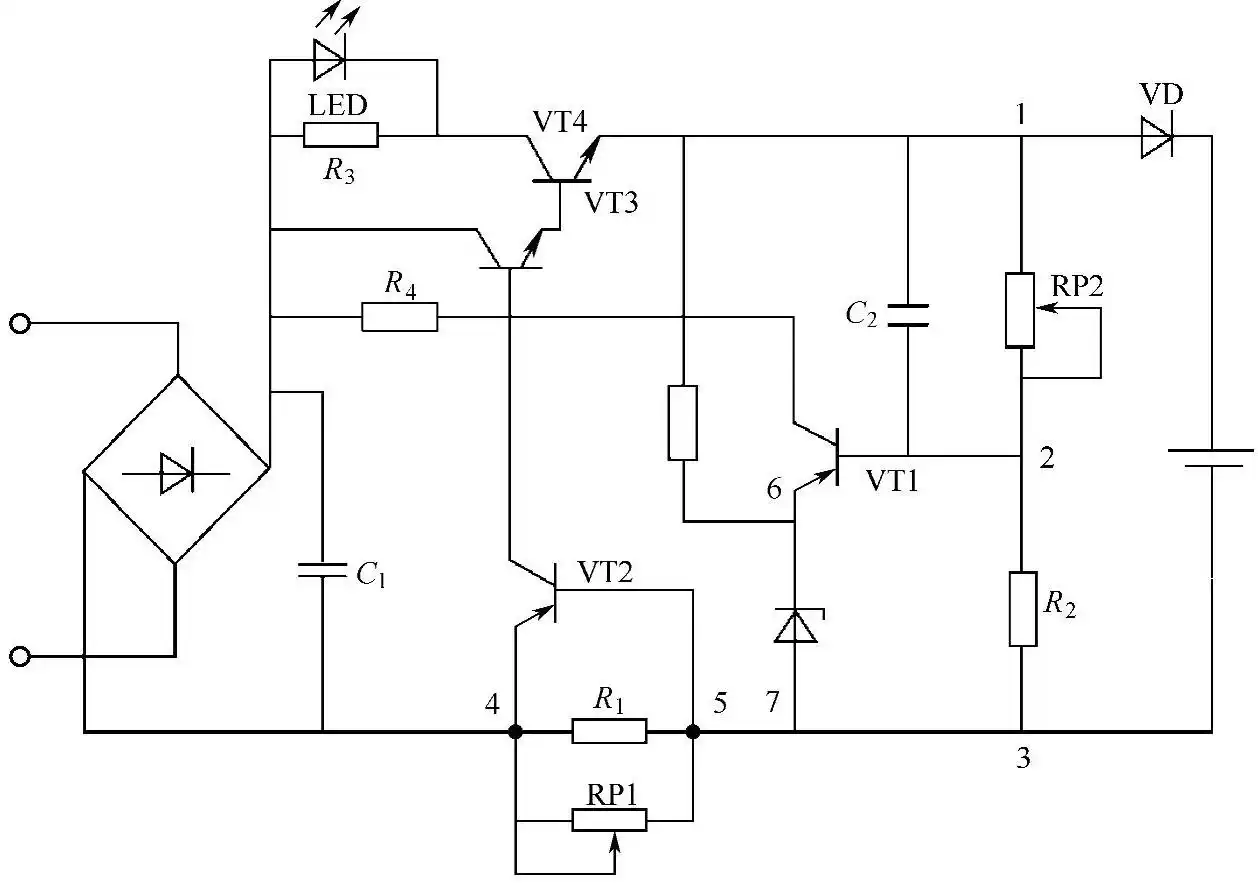
Figure 3: Charger Circuit Diagram
First, adjust potentiometer RP2 with a load connected to ensure the correct base bias voltage for VT1. If adjustment is ineffective, check whether the resistance value of R2 has changed. If there is a change, replace it; if there is no change, check RP2 again. If the adjustment is inaccurate or there is poor contact, replace it.
The specific testing method is as follows: During testing, set RP2 to its maximum position, then measure the voltage and current across the voltage divider (between points 1 and 3), across R2 (between points 2 and 3), across RP2 (between points 1 and 2). Calculate whether the resistance matches the rated value; if not, replace it.
Case 13: AC-DC Converter Charger Failure
Fault Symptoms:
The AC-DC converter charger fails to charge or does not function properly.
Troubleshooting:
The operating principles of different types of AC-DC converter chargers are similar, but their troubleshooting methods vary. Here, we will use a TL494-based switching power supply charger as an example to illustrate the troubleshooting method.
The circuit diagram of a TL494-based switching power supply charger is shown in Figure 4.
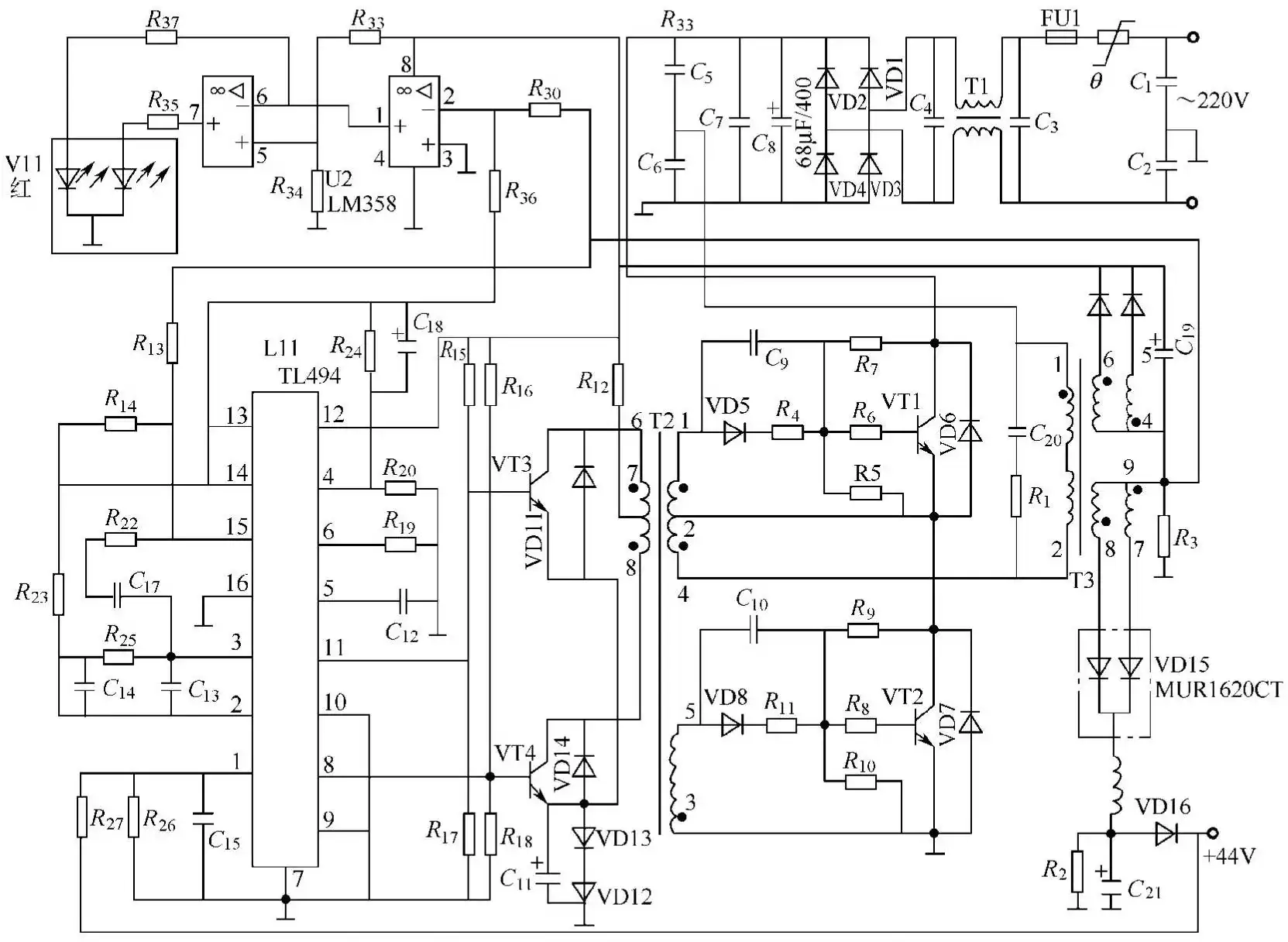
Figure 4: Circuit diagram of a TL494-based switching power supply charger
Table 2 lists the pin voltages of a TL494-based charger under no-load conditions.
Table 2 Pin voltages of a TL494-based charger under no-load conditions
| Pin Number | Voltage/V | Pin Number | Voltage/V | Pin Number | Voltage/V | Pin Number | Voltage/V |
| 1 | 3.3 | 5 | 1.5 | 9 | 0 | 13 | 5.06 |
| 2 | 3.3 | 6 | 3.9 | 10 | 0 | 14 | 0 |
| 3 | 3.6 | 7 | 0 | 11 | 2.1 | 15 | 0.15 |
| 4 | 0.5 | 8 | 2.1 | 12 | 17.65 (unstable) | 16 | 0 |
(1) The charger cannot charge. The troubleshooting steps for a charger that cannot charge are as follows:
a. First, inspect the charger’s fuses, capacitors (for swelling, cracking, or leakage), switching transistors, resistors, and circuit board solder joints (for cold solder joints or missed solder joints).
b. Test the circuit; check the power supply rectifier diodes VD1–VD4 and the switching transistors VT1–VT2, and verify that the resistance parameters of the basic circuits for VT1 and VT2 match.
c. Apply a DC voltage of approximately +20V across the TL494 power supply terminals. Use the waveform method to inspect the output waveforms at the pins of the pulse-width modulation (PWM) integrated circuit; the normal frequency is 50 kHz. Otherwise, the TL494 is damaged. Inspect the waveforms of the push-pull driver transistors; the normal waveform is a square wave with consistent amplitude across both half-cycles. Otherwise, VT3 and VT4 are damaged. Under normal conditions, the base of VT1 and VT2 should have square-wave signals at their bases; if not, this indicates that related components such as VD5, R4, R6, and C9 are faulty and should be removed and tested one by one.
d. Disconnect the external power supply to the TL494 pulse-width modulation (PWM) circuit. Connect a low-voltage power source (approximately 45 V AC) from the main power supply. After powering on, if the circuit outputs a DC voltage greater than 45 V, the circuit is functioning normally; if there is no voltage output or the voltage is too low, this indicates that fuse FU1, rectifier diodes VD1–VD4, filter capacitors C7 and C8, or switching transistors VT1 and VT2 are faulty; these components should be further inspected.
e. If the output voltage of the rectifier circuit is normal, this indicates that the rectifier circuit is functioning properly, and the modulation circuit should be checked. Connect the +20V DC power supply to the pulse-width modulation (PWM) circuit and the 45V AC low-voltage power supply to the main circuit. Check for square waveforms at the emitter of switching transistor VT1 and pins 7 and 8 of switching transformer VT3, while simultaneously touching VT1 and VT2 to check for any increase in temperature. If the waveforms are absent or distorted, and VT1 and VT2 are hot, this indicates a fault in VT1, VT2, or VD15; if the waveforms are normal but the switching transistors are not hot, further check the output voltage at the +40V terminal of the secondary-side rectifier output (across terminals C21), which should be +9V. If normal, it indicates that the entire circuit is essentially functioning properly; you may then disconnect the external power supply and connect the charger to 220V AC mains power to operate it.
(2) AC-DC Converter Charger Indicator Light Is On, but Charging Does Not Occur When an AC-DC converter charger’s indicator light is on but charging does not occur, first remove the charger’s casing to check whether VT1 and VT2 are cracked; then check whether the base circuits of VT1 and VT2—C9, C10, and VD8—are functioning normally; next, check the push-pull driver transistors VT3 and VT4. Common faults in this type of charger include overheating and damage to VT1 and VT2, as well as breakdown of VD15.
(3) AC-DC Converter Charger Indicator Light Is Off and Charging Fails The primary causes of the “AC-DC Converter Charger Indicator Light Is Off and Charging Fails” fault are: ① VT1 and VT2; ② inconsistent resistance values in the base circuits of VT1 and VT2. If VT1 or VT2 is broken, replace VT1 and VT2. If the resistance values in the base circuits of VT1 and VT2 are inconsistent, check resistor R4. If resistor R4 is damaged, replace it.
(4) If an AC-DC switching charger exhibits intermittent charging performance along with the above-mentioned faults, the first step in troubleshooting is to open the charger’s casing and inspect all solder joints on the circuit board for cold solder joints. If any are found, they should be re-soldered.
In most cases, the issue stems from cold solder joints on the interference-suppression filter capacitors or the pins of the switching transistors. Repairing or replacing the damaged components will resolve the fault.
Case 14: A Newly Purchased 36V Charger Displays “Fully Charged” Immediately Upon Connecting to the Power Source
Fault Symptoms:
A newly purchased 36V charger displays “Fully Charged” immediately upon connecting to the power source.
Troubleshooting:
First, check for voltage at the charger’s square connector; upon inspecting the vehicle’s original charger connector, it was found that the positive and negative polarities of the vehicle’s connector were reversed relative to the charger’s. Measurements also showed that the polarity at the battery box output was reversed relative to the charger, indicating that the vehicle was configured this way from the factory. Since rewiring the entire vehicle would be too labor-intensive, the charger had to be modified instead.
Open the charger’s seal without tearing it, swap the positions of the positive and negative output wires on the internal circuit board, and simultaneously replace the fuse tube in the direction of the output wires (when the polarity is reversed, the internal fuse tube of the charger will burn out). The measured voltage between the positive and negative terminals was approximately 36V, and the polarity direction matched that of the original vehicle. Test the vehicle; charging functions normally, and the fault is resolved.
Case 15: Charger Replacement
Fault Symptoms:
The charger needs to be replaced.
Troubleshooting:
Different types of batteries have different charging methods, and chargers are not interchangeable. Therefore, when replacing a charger, use one of the same model as the original vehicle. In emergency situations, a substitute charger may be used; see Table 3 for a list of compatible replacement chargers.
Table 3 Charger Substitutions
| Original Model | Substitute Model | Original Model | Substitute Model |
| C4138 | C3306C2625 | MUR1660 | BYV34-40MUR1640 |
| E13007 | E13009 | FR104 | FR107FR105 |
| TVR4N | IN5399 | FR157 | FR156FR155 |
| TL494 | PC494 |
When replacing the charger, be sure to ensure that the polarity of the output plug matches that of the battery box.
Case 16: TD-36 Charger Fails to Charge and Indicator Light Does Not Illuminate
Fault Symptoms:
The TD-36 charger for an electric bicycle fails to charge and the indicator light does not illuminate.
Troubleshooting:
Analysis of the fault symptoms indicates that the charger is not functioning; the circuit is shown in Figure 4.
Upon inspection, fuse FU1 was found blown and the fuse resistor shattered, raising suspicion that a component or switching transistor in the rectifier and filter circuit had broken down. Setting the multimeter to the diode range, in-circuit testing of the rectifier diodes and filter capacitors in the AC-to-DC conversion circuit showed normal operation; however, in-circuit testing of switching transistors VT1 and VT2 revealed that they had broken down. Since switching transistors are often damaged by overvoltage, overcurrent, or high power dissipation, the voltage regulation control circuit, the spike suppression circuit, and the switching transistor drive circuit should be inspected. The components in the spike suppression circuit were found to be normal, and the filter capacitors on the secondary side of the switching power supply were also found to be in good condition. It was suspected that the breakdown of the switching transistors was caused by excessive power dissipation. Since this charger uses a separately excited switching power supply, the power supply control chip TL494 can provide drive pulses to the switching transistors as soon as it receives power. Therefore, the 12–15 V DC voltage output from the DC regulated power supply was applied to pins 6 and 7 of the TL494 to power its internal reference voltage generator. This causes the TL494 to output a 5V voltage not only from pin 10 but also to power its internal oscillator, sawtooth wave pulse generator, and other circuits. Once powered, these circuits generate a symmetrical positive-negative switching transistor drive pulse, which is then amplified by the driver circuit and output from pins 8 and 10. An oscilloscope measurement of the pulses at pins 8 and 10 revealed that they were not only asymmetrical but also not rectangular, indicating a malfunction in the TL494 or its oscillator circuit. After verifying that the external RC timing components of the oscillator were functioning normally, the TL494 was suspected of being faulty. Upon replacing the TL494, the square-wave pulses at pins 8 and 10 returned to normal. After replacing the switching transistor, fuse, and fuse resistor, the fault was resolved.
Case 17: TD-36 Charger Fails to Charge and Indicator Light Does Not Illuminate
Fault Symptoms:
The TD-36 charger for an electric bicycle fails to charge and the indicator light does not illuminate.
Troubleshooting:
Analysis of the fault symptoms indicates that the charger is not functioning. The circuit is shown in Figure 4.
Upon inspection, fuse FU1 was found to be blown. When testing in-circuit with a multimeter set to the diode range, it was discovered that the switching transistors VT1 and VT2 were shorted. After applying a 14V supply to pins 12 and 7 of the power control chip TL494, the drive pulses output from pins 8 and 11 were found to be normal. However, when checking the collector pulses of the drive transistors VT3 and VT4, the collector pulse of VT4 was found to be abnormal, leading to the suspicion that VT4 was damaged. After replacing VT4, the waveform returned to normal; the fault was then fully resolved after replacing the other faulty components.
Case 18: Charger Built Around UC3842 and LM358 Fails to Charge and Indicator Light Does Not Illuminate
Fault Symptoms:
The charger fails to charge and the indicator light does not illuminate.
Troubleshooting:
Based on the observed symptoms, the charger is not functioning. The circuit is shown in Figure 5.
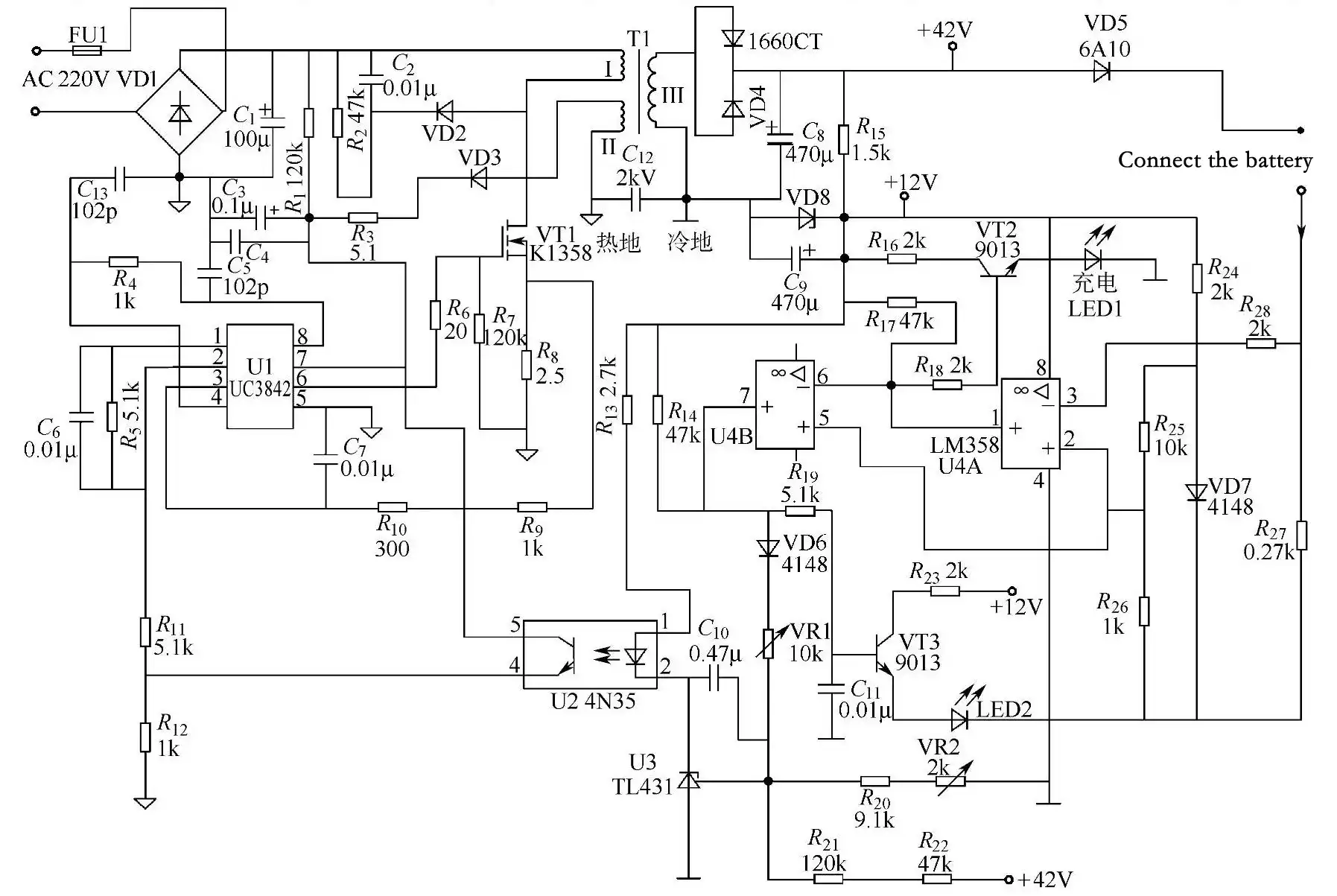
Figure 5: Charger circuit based on UC3842 and LM358
Inspection revealed that the fuse FU1 on the AC input had blown and discolored, indicating an initial diagnosis of overcurrent. Set the digital multimeter to the diode range and test the rectifier stack VD1 in-circuit; it was found to be normal. The resistance across the filter capacitor C1 was also normal. When testing the switching transistor VT1, the resistance between its three pins was found to be nearly zero, indicating that VT1 had broken down and was shorted. Further inspection revealed that the current-limiting resistors R8 and R6 were open-circuited. Since R6 was damaged, it was suspected that U1 was also damaged. VT1 breakdown is often caused by overvoltage, overcurrent, or excessive power dissipation; inspection of the spike suppression circuit—C2, R2, and VD2—showed them to be normal. After replacing the faulty components, the charger’s output voltage returned to normal when powered using either the step-down or current-limiting method, and the fault was resolved.
Case 19: Charger Based on UC3842 and LM358 Unable to Charge and Indicator Light Does Not Illuminate
Fault Symptoms:
The charger is unable to charge, and the indicator light does not illuminate.
Troubleshooting:
Refer to Figure 5; following the troubleshooting approach from the previous example, we inspected fuse FU1, which was blown and discolored, indicating an overcurrent condition in the switching power supply. During in-circuit testing, the switching transistor VT1 was found to be shorted due to breakdown. Further inspection revealed that the current-limiting resistors R8 were open-circuited. Inspection of the spike absorption circuit—C2, R2, and VD2—revealed that these components were normal. After replacing the damaged components and powering the charger using a step-down method, the voltage across C8 was higher than normal, indicating an abnormality in the voltage regulation control circuit. Upon inspecting the voltage regulation control circuit, it was found that the adjustable resistor VR1 had poor contact. After replacing and adjusting it, the fault was resolved.
Case 20: Charger Built Around UC3842 and LM358 Fails to Charge and Indicator Light Does Not Illuminate
Fault Symptoms:
The charger fails to charge and the indicator light does not illuminate.
Troubleshooting:
Analysis of the fault symptoms indicates that the charger is not functioning.
Referring to Figure 5, we checked that fuse FU1 was intact, leading to the preliminary conclusion that there was no overcurrent in the switching power supply. After applying power, we measured the output voltage of the switching power supply, confirming that the charger was indeed not functioning. A voltage of 300 V was measured across the filter capacitor C1, indicating that the AC input and conversion circuits were functioning normally. Measuring pin 7 (the power supply pin) of the power control chip U1 (UC3842) revealed no voltage, indicating that the startup resistor R1 is open-circuited or that there is a short circuit involving components connected to pin 7 of U1. After turning off the power, use a 100W incandescent bulb to discharge the voltage stored in C1, then set the digital multimeter to the diode test mode and measured the resistance between pin 7 of U1 and ground in-circuit; the value was normal, indicating no short circuit. Suspecting that R1 was open or had increased in resistance, I desoldered R1 and found it was indeed open. After replacing it with a 120k/3W resistor, the fault was resolved.
Note: Since the filter capacitor C1 retains a voltage for a certain period after the mains power is cut off when the switching power supply is not operational, you must discharge the stored voltage before performing repairs to avoid exacerbating the fault or risking electric shock.
Case 21: Charger Based on UC3842 and LM358 Fails to Charge and Indicator Light Does Not Illuminate
Fault Symptoms:
The charger fails to charge and the indicator light does not illuminate.
Troubleshooting:
Refer to Figure 5. Following the troubleshooting approach from the previous example, the fuse FU1 was found to be intact. Measurement revealed no voltage at pin 7 (the power supply input) of the power control chip U1 (UC3842). After disconnecting the power supply, discharge the stored voltage in capacitors C1. Then, measure the in-circuit resistance between pin 7 of U1 and ground—the open-circuit resistance was abnormal. After leaving pin 7 of U1 floating, a short circuit was detected between pin 7 and ground, indicating a fault in U1. Replace it with a UC3842 or KA3842 to resolve the issue.
Case 22: Charger Built Around UC3842 and LM358 Cannot Charge and Indicator Light Does Not Illuminate
Fault Symptoms:
The charger cannot charge and the indicator light does not illuminate.
Troubleshooting:
Refer to Figure 5. Following the troubleshooting approach from the previous example, the fuse FU1 was found to be normal. A startup voltage was measured at pin 7 (the power supply input) of the power supply control chip U1 (UC3842), but no output voltage was detected at pin 8. This suggests that the internal reference voltage generator of U1 is damaged. Replacing it with a UC3842 will resolve the issue.
Case 23: Charger Built Around UC3842 and LM358 Cannot Charge, but Indicator Light Is On
Fault Symptoms:
The charger cannot charge, but the indicator light is on.
Troubleshooting:
Analysis of the fault symptoms indicates that the charger’s switching power supply is operational, but the voltage output section is malfunctioning.
Refer to Figure 5. Upon inspecting the voltage output section, it was found that the sampling resistor R27 was open-circuited. After replacing it with a 0.27Ω/3W resistor, the fault was resolved.
Case 24: Charger Built Around UC3845, LM393, and LM339 Fails to Charge and Indicator Light Does Not Illuminate
Fault Symptoms:
The charger fails to charge and the indicator light does not illuminate.
Troubleshooting:
Analysis of the fault symptoms indicates that the charger’s switching power supply is not functioning properly.
Refer to Figure 6. Inspection of fuse FU1 confirmed it was intact, leading to the preliminary conclusion that the switching power supply was not experiencing overcurrent. After powering on, no voltage output was measured from the switching power supply, indicating that the charger was indeed not functioning. A voltage of 309 V was measured across the filter capacitor C1, indicating that the AC input and conversion circuits are functioning normally. Immediately upon power-up, a startup voltage was measured at pin 7 (power supply pin) of the power control chip UC3845; however, no drive pulse was detected at pin 6, indicating that the UC3845 is malfunctioning. A sawtooth wave pulse was observed at pin 4, indicating that the oscillator is functioning normally; therefore, the voltage regulation control circuit or the AC overvoltage protection circuit is suspected to be faulty. After disconnecting VD3, the switching power supply returned to normal operation, confirming that the fault was indeed caused by the mains overvoltage protection circuit tripping. Since the voltage across C1 was normal, this indicates that the mains voltage was within the normal range, suggesting that the protection circuit had malfunctioned. A measurement showed that the voltage at pin 2 of the LM393 was higher than that at pin 3, indicating a problem with the sampling circuit. Upon inspecting the sampling circuit of the mains overvoltage protection circuit, it was found that the adjustable resistor RP2 was open. After replacing and adjusting it, the fault was resolved.
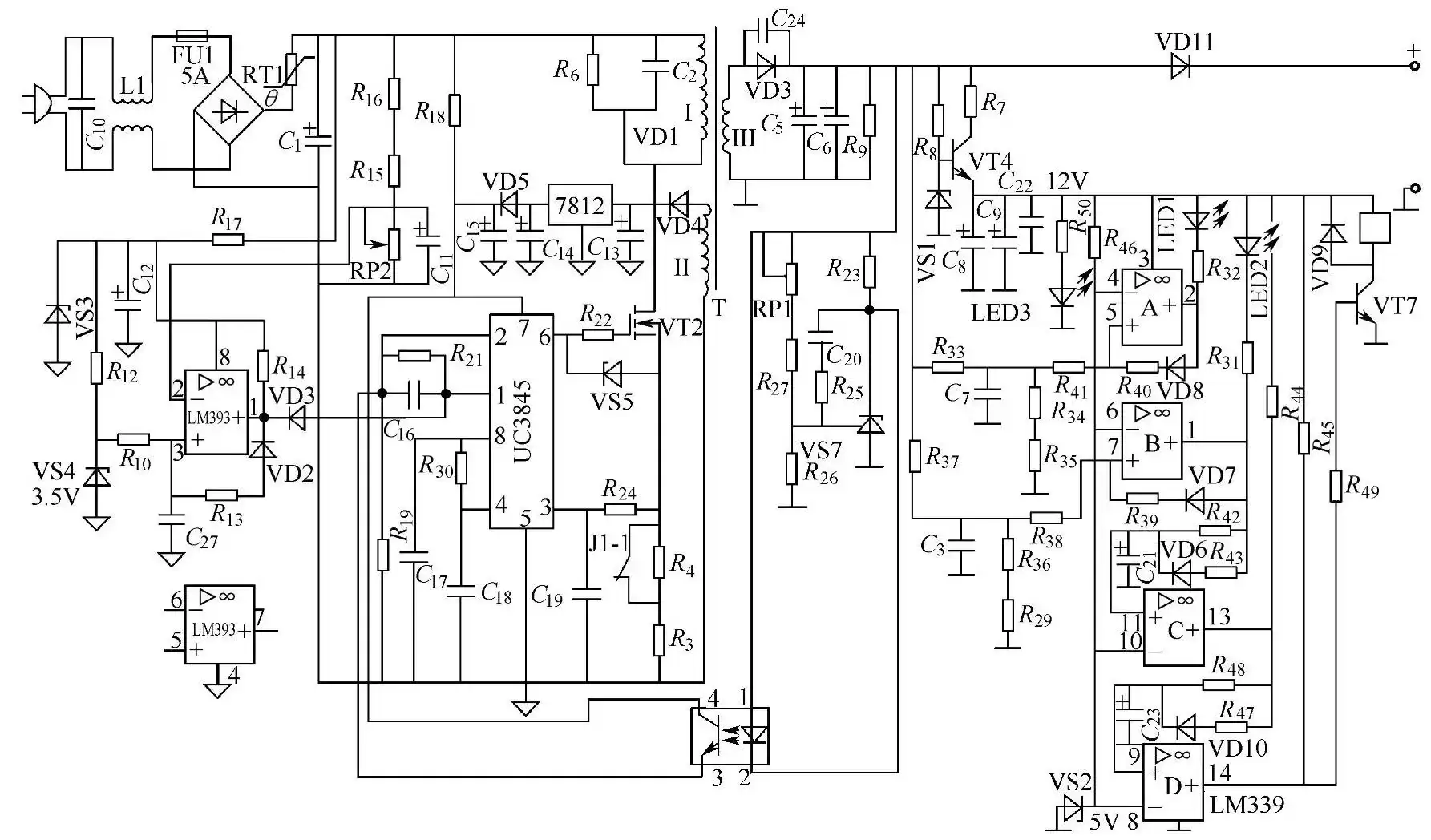
Figure 6: Charger circuit based on UC3845 and LM339
Case 25: Charger Built with UC3845, LM393, and LM339 Fails to Charge Quickly
Fault Symptoms:
The charger fails to charge quickly.
Troubleshooting:
Analysis of the fault symptoms indicates that the charger’s voltage regulation control circuit or charging control circuit is malfunctioning; see Figure 6 for the circuit diagram.
When charging a used battery, the sound of relay J1’s contacts releasing should be heard; otherwise, it indicates J1 or its control circuit is faulty. Measuring the base of J1’s driver transistor VT7 revealed no drive voltage input, indicating that the control circuit is not functioning normally. The fault was caused by a problem with VT7 or J1. Inspection revealed leakage in the collector-emitter junction of VT7; after replacement, the fault was resolved.
Case 26: Charger Built Around TL494 and LM358 Unable to Charge and Indicator Light Does Not Illuminate
Fault Symptoms:
The charger is unable to charge, and the indicator light does not illuminate.
Troubleshooting:
Analysis of the fault symptoms indicates that the charger is malfunctioning; see Figure 7 for the circuit diagram.
Inspection revealed that fuse FU1 in the AC input circuit had blown and discolored, indicating a short circuit in the switching power supply. A visual inspection found that the line filter capacitor C3 in the AC input circuit was shorted and had cracks; no abnormalities were found in other components. After replacing C3, the fault was resolved.
Note: For emergency repairs, C3 may be omitted.
Case 27: Charger Based on TL494 and LM358 Fails to Charge and Indicator Light Does Not Illuminate
Fault Symptoms:
The charger fails to charge and the indicator light does not illuminate.
Troubleshooting:
Refer to Figure 7. Following the troubleshooting approach from the previous example, fuse FU1 was found to be intact, indicating that the switching power supply likely did not experience overcurrent. After powering on, a voltage of 315V was measured across the filter capacitor C8, indicating that the AC input circuit is functioning normally. No voltage was measured across C21, indicating that the self-oscillating circuit is not operating. Immediately upon power-up, no voltage was measured at the base of the switching transistor VT1, indicating that the startup resistor R7 is damaged. Upon desoldering and testing, it was indeed found to be open-circuited; after replacement, the fault was resolved.
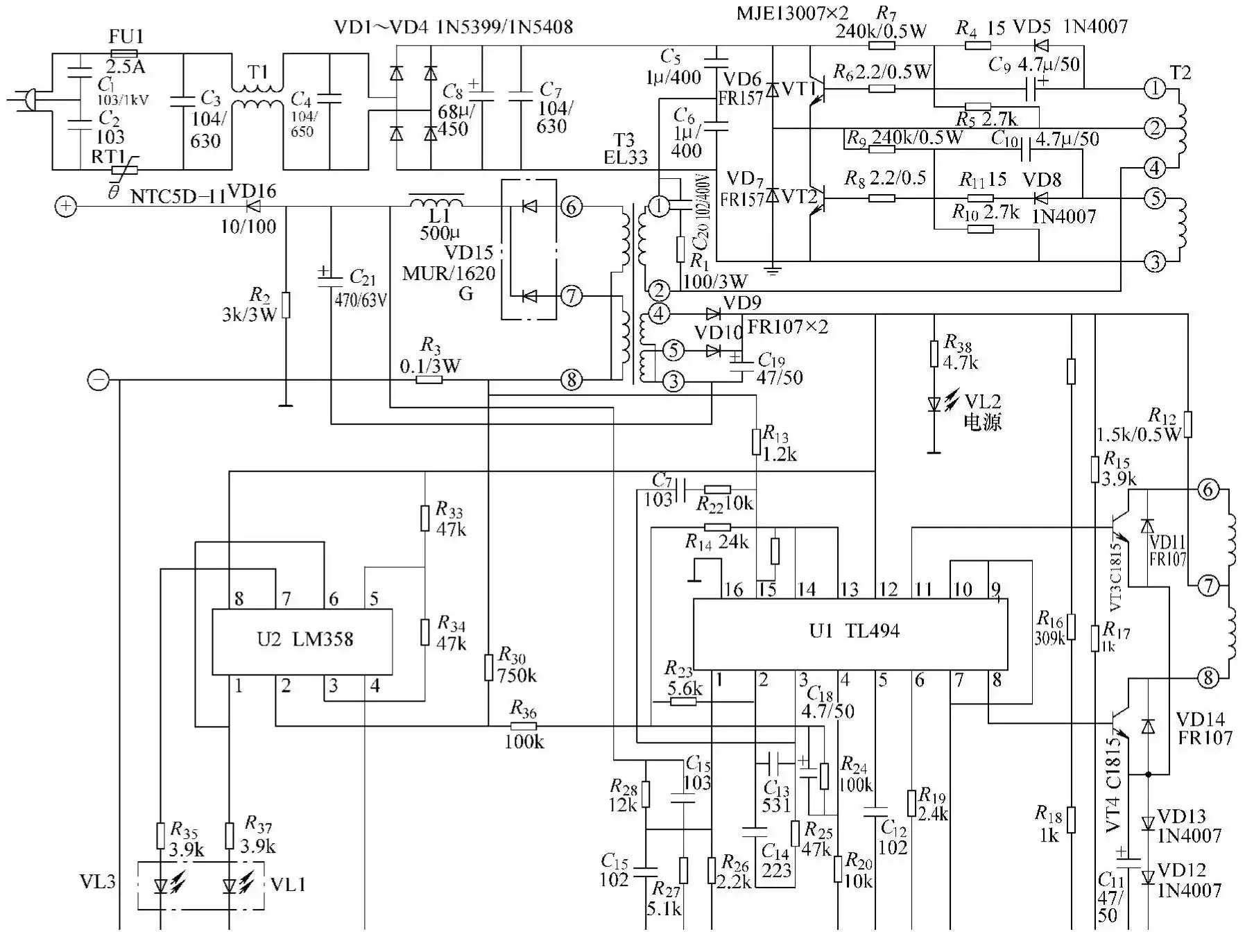
Figure 7: Schematic diagram of a charger built with TL494 and LM358
Case 28: Pulse-Type Charger Built with TL494, LM358, and CD4011 Lacks a Discharge Function
Fault Symptoms:
The pulse-type charger lacks a discharge function.
Troubleshooting:
Analysis of the fault symptoms indicates that the problem lies in the discharge control circuit; see Figure 8 for the circuit diagram.
Upon inspecting the discharge control circuit, it was found that fuse FU2 had blown and discolored, indicating a malfunction in the power amplifier transistor of the discharge control circuit. An in-circuit check revealed that VT6 had broken down and shorted; the fault was resolved after replacing the transistor.
Case 29: Pulse-Type Charger Built with TL494, LM358, and CD4011 Lacks a Discharge Function
Fault Symptoms:
The pulse-type charger lacks a discharge function.
Troubleshooting:
Refer to Figure 8. Following the troubleshooting approach from the previous example, fuse FU2 was found to be intact, indicating that the power amplifier transistor in the discharge control circuit was not short-circuited. Measuring the base of VT5 revealed no drive pulse input, indicating a malfunction in the drive pulse generation circuit. Upon inspecting this circuit, it was found that C24 was damaged; the fault was resolved after replacement.
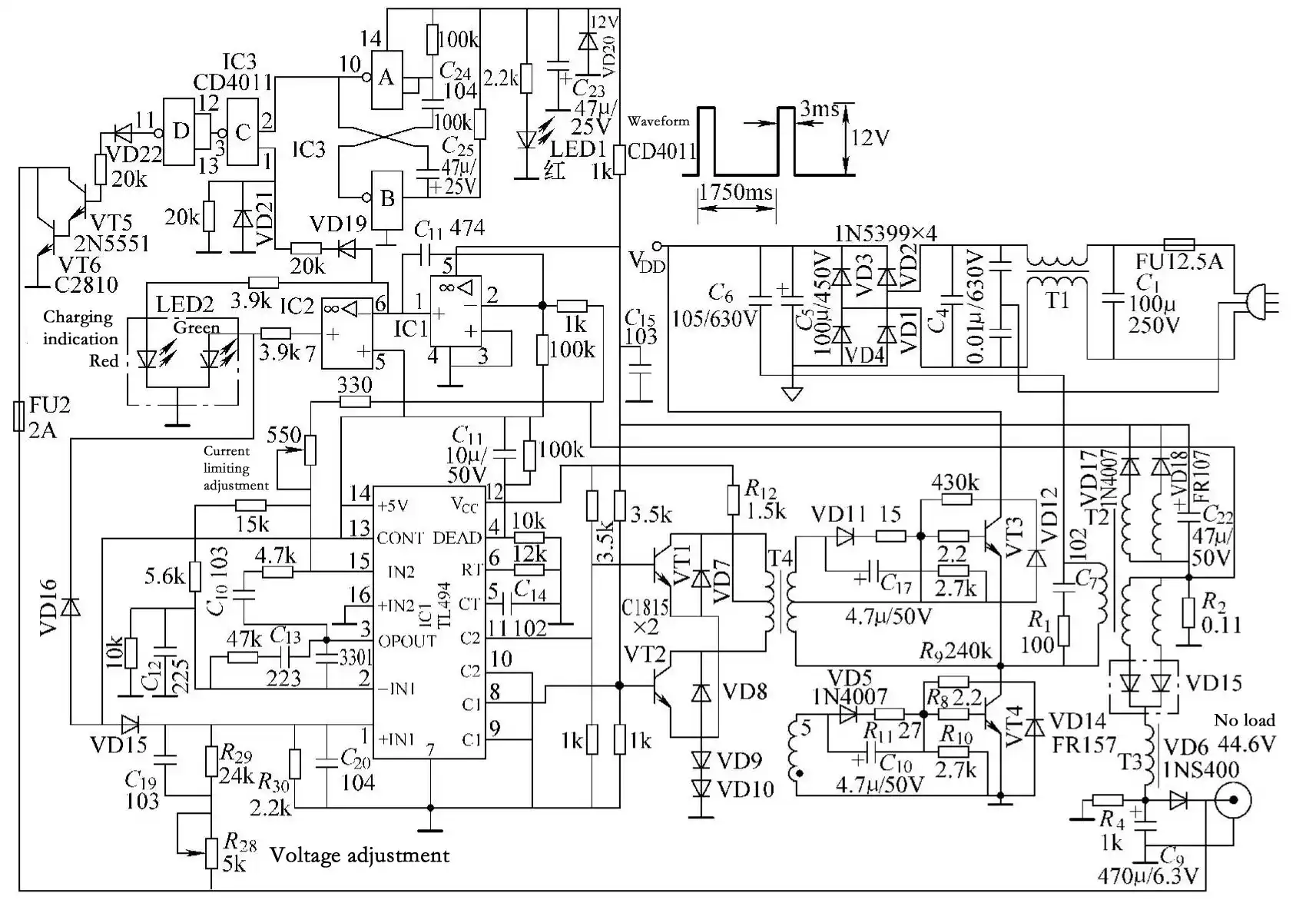
Figure 8: Pulse-type charger circuit composed of TL494, LM358, and CD4011
Case 30: A Certain Brand of Charger Fails to Charge and Indicator Light Does Not Illuminate
Fault Symptoms:
The charger fails to charge and the indicator light does not illuminate.
Troubleshooting:
Analysis of the fault symptoms indicates that the charger’s switching power supply is not functioning; see Figure 9 for the circuit diagram. Inspection revealed that fuse FU1 had blown, indicating a component leakage or short circuit. Setting an analog multimeter to the resistance range and measuring the rectifier diodes VD1–VD4 in-circuit showed normal readings; however, when measuring the filter capacitor C6, a low resistance value was found, indicating that either C6 or the switching transistor VT8 had broken down. Measurements between the gate (G) and drain (D) and source (S) of VT8 showed normal resistance, indicating that VT8 is functioning properly. The fault was caused by the breakdown of C6. After replacing it with a 68 μF/400 V capacitor, the fault was resolved.
Case 31: A Certain Brand of Charger Fails to Charge and Indicator Light Does Not Come On
Fault Symptoms:
The charger fails to charge and the indicator light does not come on.
Troubleshooting:
Refer to Figure 9. Following the troubleshooting approach from the previous example, it was found that fuse FU1 had blown, indicating a component with a leakage current or a short circuit. When testing the rectifier diodes VD1–VD4 in-circuit, it was discovered that VD3 and VD4 were shorted. After verifying that the other components were normal, the fault was resolved by replacing them with two 1N5408 diodes.
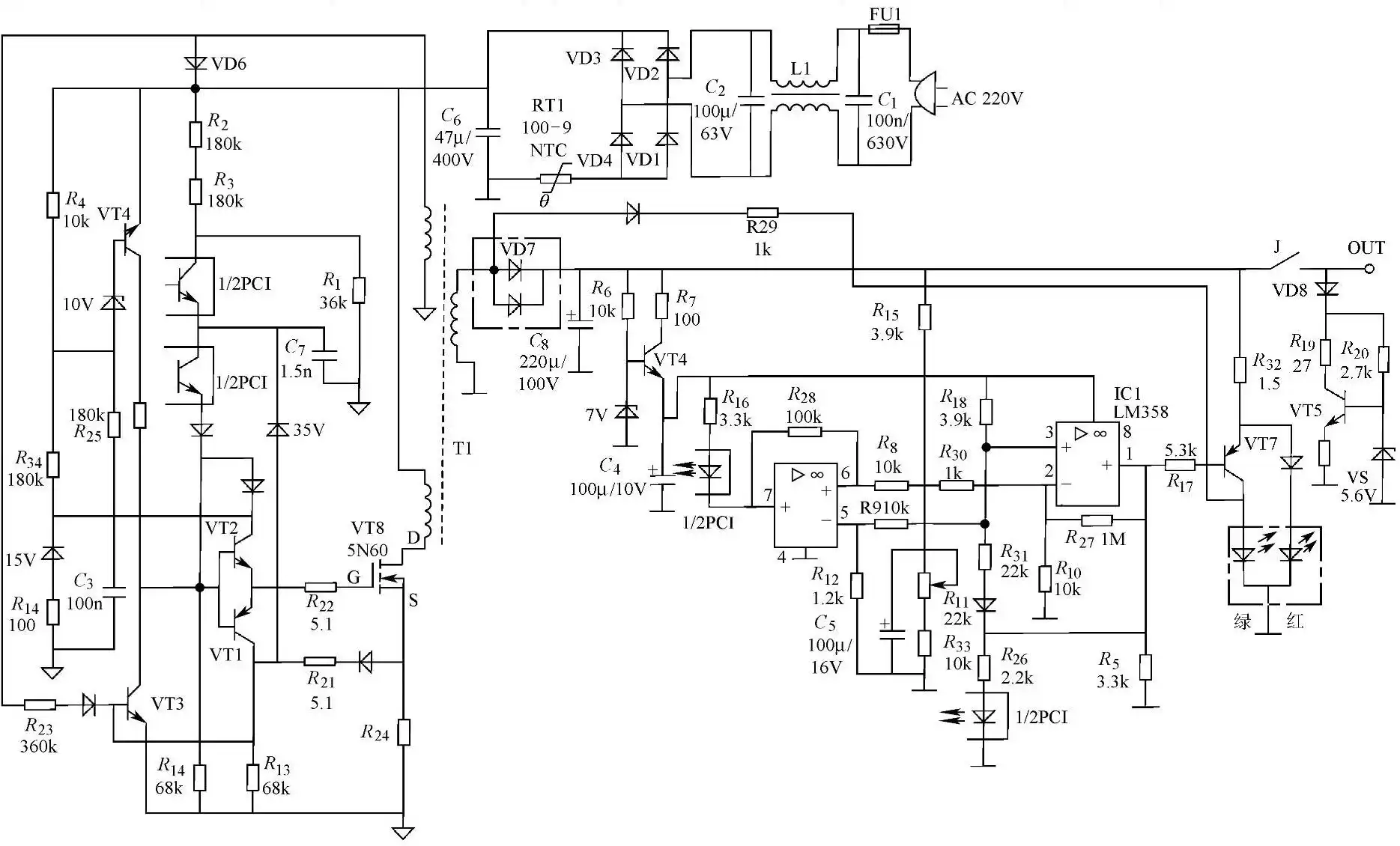
Figure 9: “XX” Brand Charger Circuit
Case 32: A Certain Brand of Charger Fails to Charge, but Indicator Light Is On
Fault Symptoms:
The charger fails to charge, but the indicator light is on.
Troubleshooting:
Analysis of the fault symptoms indicates that the charger’s switching power supply is operational, but the charging voltage output circuit is malfunctioning. As shown in Figure 9, this charger is equipped with a battery reverse-connection protection circuit centered on relay J and transistor VT5. After the battery is connected, the battery’s existing voltage is split into two paths via diode VD8: one path passes through resistors R19 to supply power to the driver transistor VT5; the other path is current-limited by resistor R20 to establish a 5.6V reference voltage across the Zener diode VS. When this voltage is applied to the base of VT5, the 5V voltage output from its emitter powers the drive coil of relay J. The magnetic field generated by this coil causes the contacts to close, and only then can the voltage output from the switching power supply charge the battery. Therefore, if the battery is not installed or the reverse battery connection protection circuit malfunctions, relay J will not operate. Upon inspection, a voltage of 13V was found between the positive terminal of VD8 and ground, while no voltage was measured at the base of VT5. This indicates that R20 is open-circuited or VD10 is short-circuited. Inspection revealed that VD10 was short-circuited; replacing it resolved the fault.
Case 33: KGC36018 Smart Charger Has No Voltage Output
Fault Symptoms:
The KGC36018 smart charger has no voltage output.
Troubleshooting:
Based on the fault symptoms, the charger is malfunctioning. See Figure 10 for the circuit diagram.
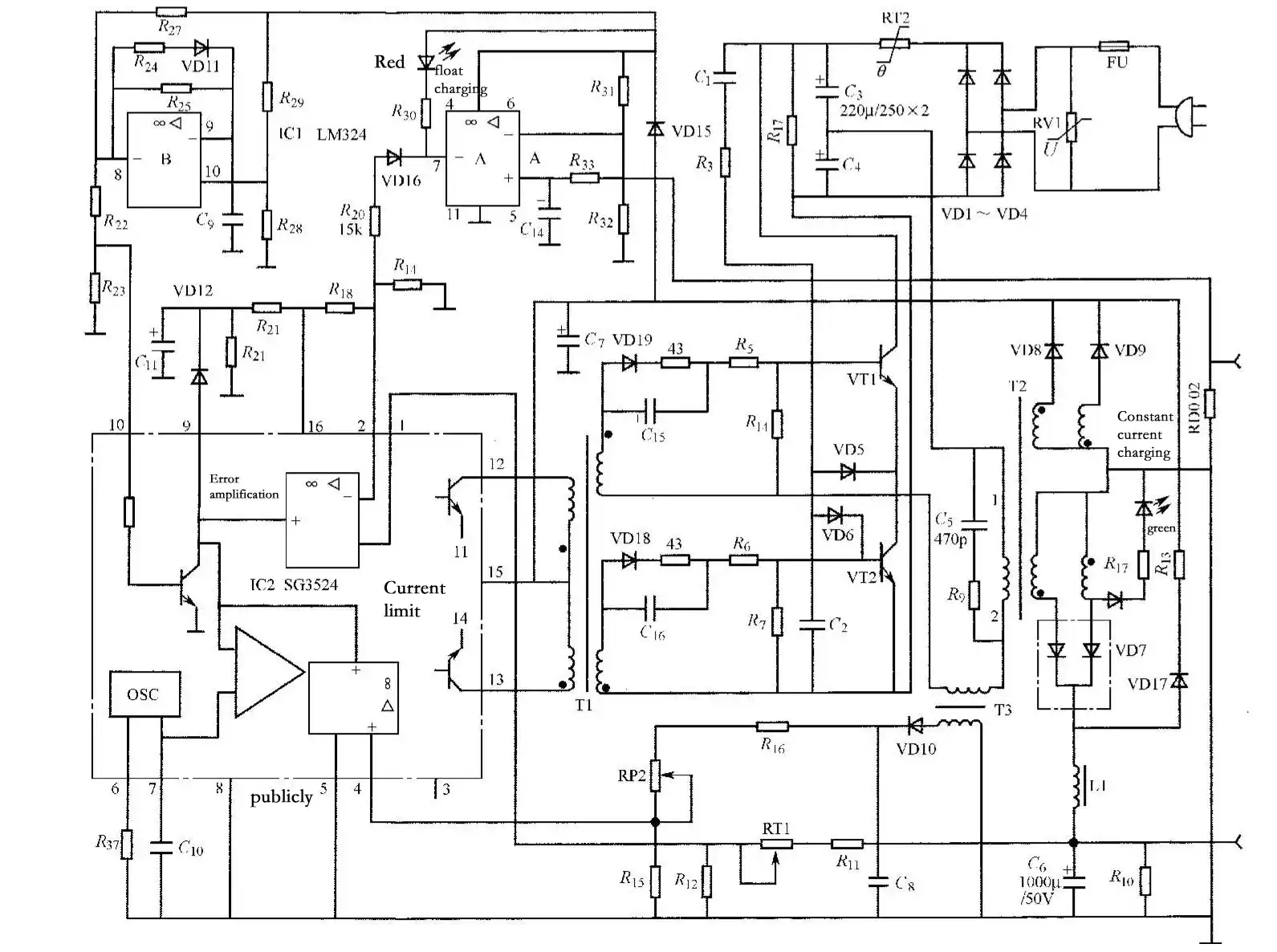
Figure 10: Charger Circuit Diagram
Upon inspecting the fuse FU in the mains input circuit, it was found to be blown and blackened, indicating a severe overcurrent condition in the switching power supply. Upon inspecting the components in the AC input circuit, it was found that the varistor RV1, used for AC overvoltage protection, had broken down. The other components were found to be normal; the fault was resolved after replacing RV1.
Note: If RV1 is not available during repair, it can be omitted; this will not affect the charger’s normal operation when the AC power is stable.
Case 34: Charger Works Intermittently
Fault Symptoms:
The charger works intermittently.
Troubleshooting:
Open the casing and inspect the solder joints on the circuit board. Insufficient solder was observed; upon closer inspection, a cold solder joint was found on one pin of the anti-interference filter inductor. Re-solder the joints with insufficient solder on the circuit board, focusing on the filter inductor and the pins of the switching transistors. After re-soldering, the unit operated normally.
Case 35: Indicator Light Does Not Illuminate, Not Charging
Fault Symptoms:
The indicator light does not illuminate, and the charger is not charging.
Troubleshooting:
A visual inspection revealed that the switching transistors VT1 and VT2 were cracked. After replacing VT1 and VT2, further inspection revealed inconsistent resistance in their base circuits. Finally, it was determined that R4 was faulty. After replacement and successful verification in Steps 3 and 4, the unit operated normally when plugged in.
Case 36: Indicator Light Is On, but Not Charging
Fault Symptoms:
The indicator light is on, but the charger is not charging.
Troubleshooting:
Step 1: A visual inspection revealed that VT1 and VT2 were cracked. Step 2: A resistance test revealed that the base circuits C9, C10, and VD8 were damaged. After replacement, Step 3 involved a waveform analysis that detected signal waveform distortion in VT3 and VT4; upon removing VT3 and VT4, the push-pull driver transistors were found to be damaged.
At the time, because the user was in a hurry, Step 4 was skipped. Immediately after plugging in the power supply, the fuse burned black, and VT1 and VT2 exploded. After replacement, Step 3 showed normal operation, but the fourth-step inspection revealed abnormal waveforms at pins 7 and 8 of T3, with VT1 and VT2 overheating. The final inspection identified that VD15 had broken down.
After replacement, the waveforms at pins 7 and 8 of T3 returned to normal, VT1 and VT2 no longer overheated, and the +40V output terminal showed a voltage of approximately 9V, with the unit functioning normally.