
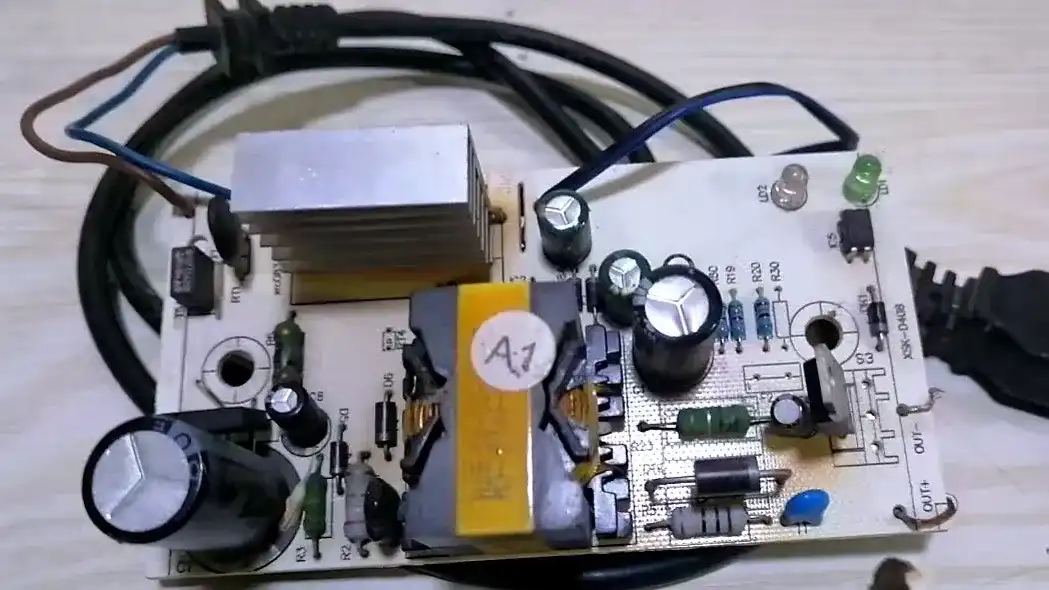
How to Troubleshoot Common Electric Bike Charger Faults
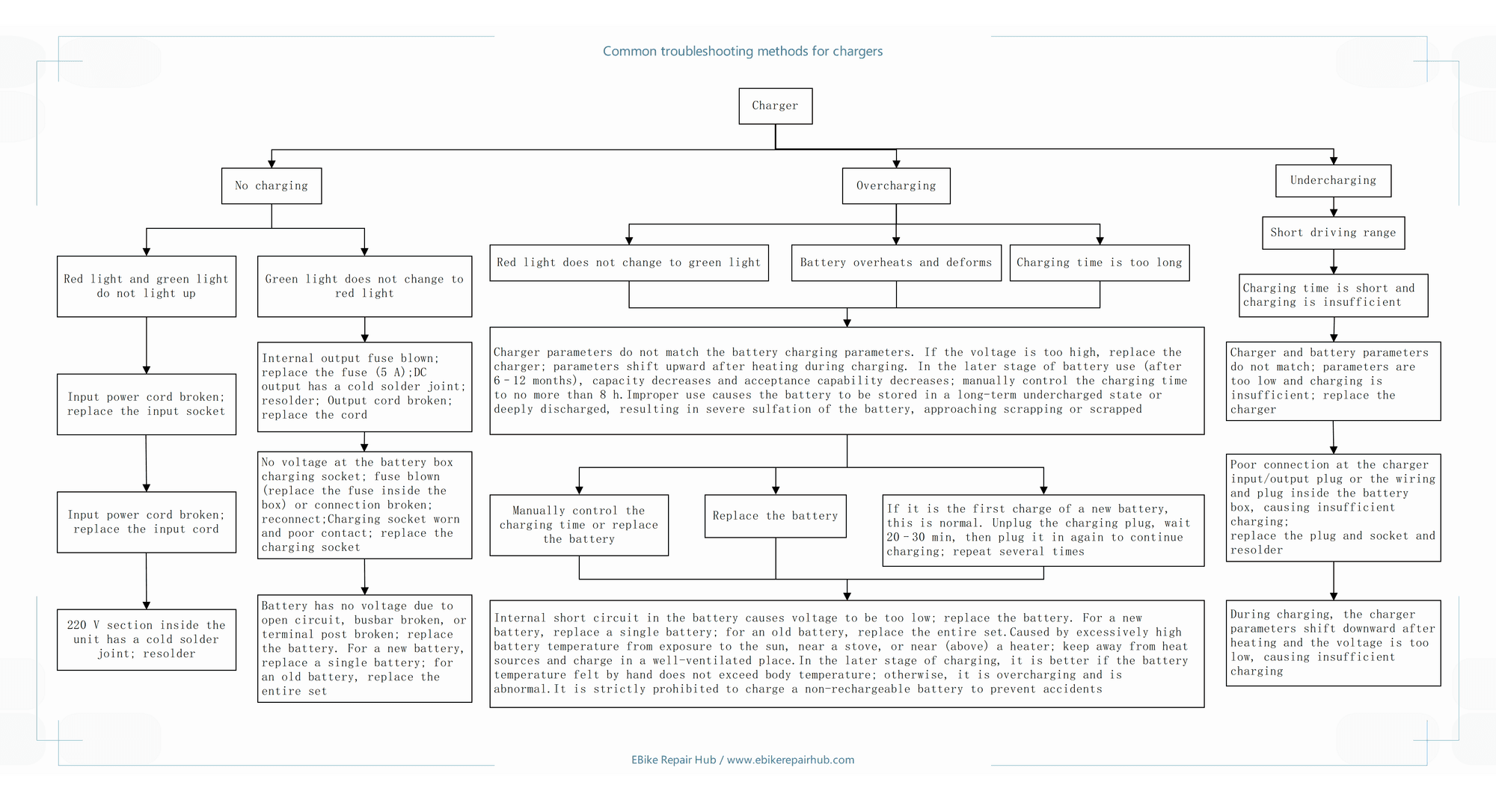
A charger usually fails in one of three ways. It delivers no charge at all, it overcharges the battery, or it undercharges and the bike comes up short on range. The three look nothing alike once you know what to check, and each one has a different culprit. The fault tree below covers all three: start from the category that matches your symptom, follow the branch, and every path ends at a specific part to test and a specific fix.
Diagnostic Flowchart
1. No Charging: Let the Indicator Lights Decide
When the charger delivers nothing, the indicator lights tell you which of two paths to take.
Symptom A: Red and green lights both off
Both lights dead means the charger never powered up, so the fault is on the AC input side. Work through it in order:
- Check the input cord and the wall socket. A broken input path is the most common failure and the cheapest fix. If the socket is at fault, replace it.
- If the socket is fine, inspect the cord itself for internal breaks. Pay attention to the two spots where cords usually fail: right at the plug, and at the strain-relief point where the cord enters the charger.
- If cord and socket both check out, the problem is inside the charger, typically an open solder joint on the 220V section. That is mains voltage. Unless you have worked on live mains circuits before, hand this step to a qualified technician.
Real case: Over the years of repair work, I once came across an unusual one. From the outside, the plug of the charger’s power cord looked perfectly fine, and testing the cord with an inductive breakpoint detector showed no break at all. The real cause was that the solder joint where one metal blade of the plug connected to the wire had come apart. Since the plug is molded as a single piece, there is no way to see the problem from the outside — you have to use a tool to measure continuity from the plug all the way to the circuit board to make the call. You cannot judge this one by eye.
Symptom B: Green light never turns red
Here the charger powers up, but charging never completes: the green light stays green. This path runs from the charger’s DC output all the way to the battery, and the order matters.
- Start at the charger output. The internal output fuse may be blown (replace it with a 5A fuse of the same rating), there may be an open solder joint on the DC output side, or the output wire itself may be broken.
- Next, the battery-box charging socket. No voltage at the socket can mean a blown fuse inside the box or a broken connection; reconnect or replace as needed. A worn socket with poor contact should simply be replaced.
- Last, the battery itself. If it shows no voltage at all, look for an open circuit, a broken busbar, or a broken terminal post. For a new battery you can replace just the failed cell; for an old one, replace the whole pack.
Charger output first, then the socket, then the battery. Skip the order and you end up replacing a good battery because of a bad fuse.
2. Overcharging: Three Symptoms, One Root Cause
Overcharging shows up as a red light that never turns green, a battery that overheats and deforms, or charging that simply takes too long. If the battery is hot or swollen, stop charging it right away; that is the dangerous case.
In the fault tree, all three symptoms trace back to the same root causes:
The most common is a mismatch between the charger’s parameters and the battery’s charging parameters. If the output voltage is too high, replace the charger. One thing worth knowing: a charger’s parameters can drift upward as it heats up during charging, so a unit that measures fine when cold may overcharge once warm.
The second is battery age. After roughly 6 to 12 months of use, capacity and charge acceptance decline, and the termination logic may never trigger. From that point on, limit charging manually to no more than 8 hours.
The third is usage habit. A battery stored in a discharged state for long periods, or one that gets deeply discharged repeatedly, will sulfate severely. At that stage it is near the end of its life, or past it.
The remedies follow from the causes: control the charging time manually or replace the battery if it can no longer terminate on its own; replace the battery outright if sulfation or deformation has already done irreversible damage. There is one benign exception. If the battery is brand new and this is its first charge, long charging can be normal: unplug the connector, wait 20 to 30 minutes, plug it back in, and repeat a few times.
Real case: There is a common failure that is very easy to overlook: the square metal contacts inside the T-type plug of the charger’s output port can deform over time from repeated plugging and unplugging, which then causes poor contact with the connector in the e-bike’s charging socket. The reason it is so easy to overlook is that right after you plug in the T-type connector, the charger shows a red light, indicating normal charging — but after a while it switches to green, indicating that charging is complete. What actually happens is that the square metal contacts inside expand as they heat up during charging, losing contact with the plug in the e-bike’s charging socket; in reality the circuit is already open. You think the battery charged all night, but in fact it only charged for a short while.
The safety warnings at the bottom of the chart
Every remedy in this branch feeds into the same block of warnings, and they deserve to be read, not skimmed:
- A battery with an internal short circuit and abnormally low voltage must be replaced. Single cell for a new battery, whole pack for an old one.
- Batteries also overheat from their environment: direct sunlight, a stove, a heater, or charging on top of one. Keep the charger and battery away from heat sources and charge where air can move.
- The touch test: late in the charge cycle, the battery should feel no hotter than your own skin. If it does, that is overcharging, and it is not normal. Stop and find out why.
- Never charge non-rechargeable batteries. They can leak, rupture, or catch fire.
3. Undercharging: The Short-Range Chain
Undercharging announces itself as short riding range. The bike runs, it just gives up early. The chart walks a chain of four checks:
- Charging time too short. Start here, because it is the simplest explanation: the battery may never have gotten a full cycle.
- Charger and battery parameters mismatched. If the charger’s parameters are too low, the battery never reaches full charge. Replace the charger with the correct specification.
- Poor contact at the charger plugs, or at the wiring and plugs inside the battery box. Contact resistance quietly steals voltage and current. Replace worn plugs and sockets, and resolder where needed.
- Downward parameter drift. This is the mirror image of the overcharging case: some chargers sag as they warm up, delivering lower voltage and leaving the battery undercharged. If everything else checks out, suspect this and replace the charger.
That last point deserves emphasis. Heat can push a charger’s output in either direction, up toward overcharging or down toward undercharging. A charger that only misbehaves once warm is still a faulty charger, even if it benches fine when cold.
4. Safety Notes
- The internal 220V section carries mains voltage. Resoldering there is work for qualified technicians only, and the charger should be unplugged before anyone opens anything. Many chargers are not meant to be opened at all.
- Replace fuses only with the original rating, 5A in this chart. Never fit a larger fuse or bypass one with wire. The fuse is designed to fail before the wiring does.
- A battery that is hot, swollen, or deformed is a fire risk. Stop charging, move it away from anything flammable, and do not put it back into service.
- Charge in a well-ventilated place, away from sunlight, stoves, and heaters. Never on top of a heater.
- Never charge non-rechargeable batteries.
- When replacing cells: a single cell for a new pack, the whole pack for an old one. Mixing new and old cells in an aged pack does more harm than good.
5. Summary
If both lights are dead, work the input side: socket, cord, then the internal 220V joints. If the lights work but the green never turns red, work the output side in order: fuse, solder joints, wire, socket, battery. If the red light never turns green or the battery runs hot, treat it as overcharging, respect the 8-hour limit, and use the touch test. If the range falls short, treat it as undercharging: full charge time first, then parameters, contacts, and finally heat drift. Follow the branches in order and stop at the first fault you can confirm.
For charger testing methods and repair case analysis, see our main guide: E-Bike Charger Testing & Repair: 36 Case Studies